F446 CAN Bridge
Config Firmware
Use the command below to enter the firmware configuration interface.
cd ~/klipper
make clean
make menuconfig
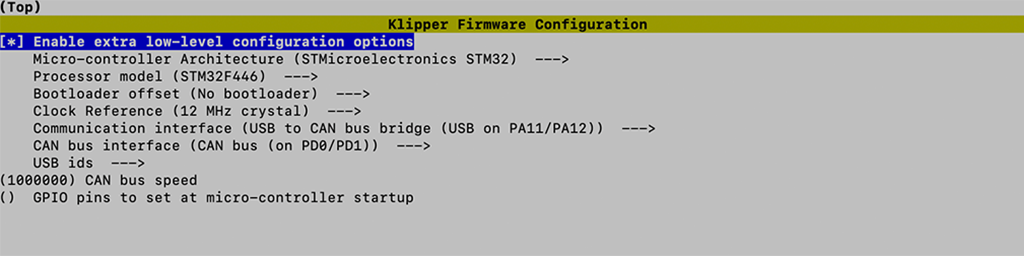
Compile Firmware
make
Flash Firmware
Short the Boot0 jumper then press the reset button. Use lsusb commend to check.
Bus 001 Device 001: ID 0483:df11 STMicroelectronics STM Device in DFU Mode
Use the commend below to flash firmware into mcu.
make flash FLASH_DEVICE=0483:df11
Find CANBUS UUID
Config Linux CAN Network before move on.
Use the commend below to find canbus_uuid
~/klippy-env/bin/python ~/klipper/scripts/canbus_query.py can0
If uninitialized CAN devices are detected the above command will report lines like the following:
Found canbus_uuid=11aa22bb33cc, Application: Klipper
Configuring Klipper
Update the Klipper mcu configuration in printer.cfg to use the CANBUS communicate with mcu.
printer.cfg
[mcu]
canbus_uuid: 11aa22bb33cc